Model Management
Everything starts with a loaded model. miLLM downloads models from HuggingFace (or imports from a local path), loads one model at a time onto the GPU, and optionally quantizes it as it loads.
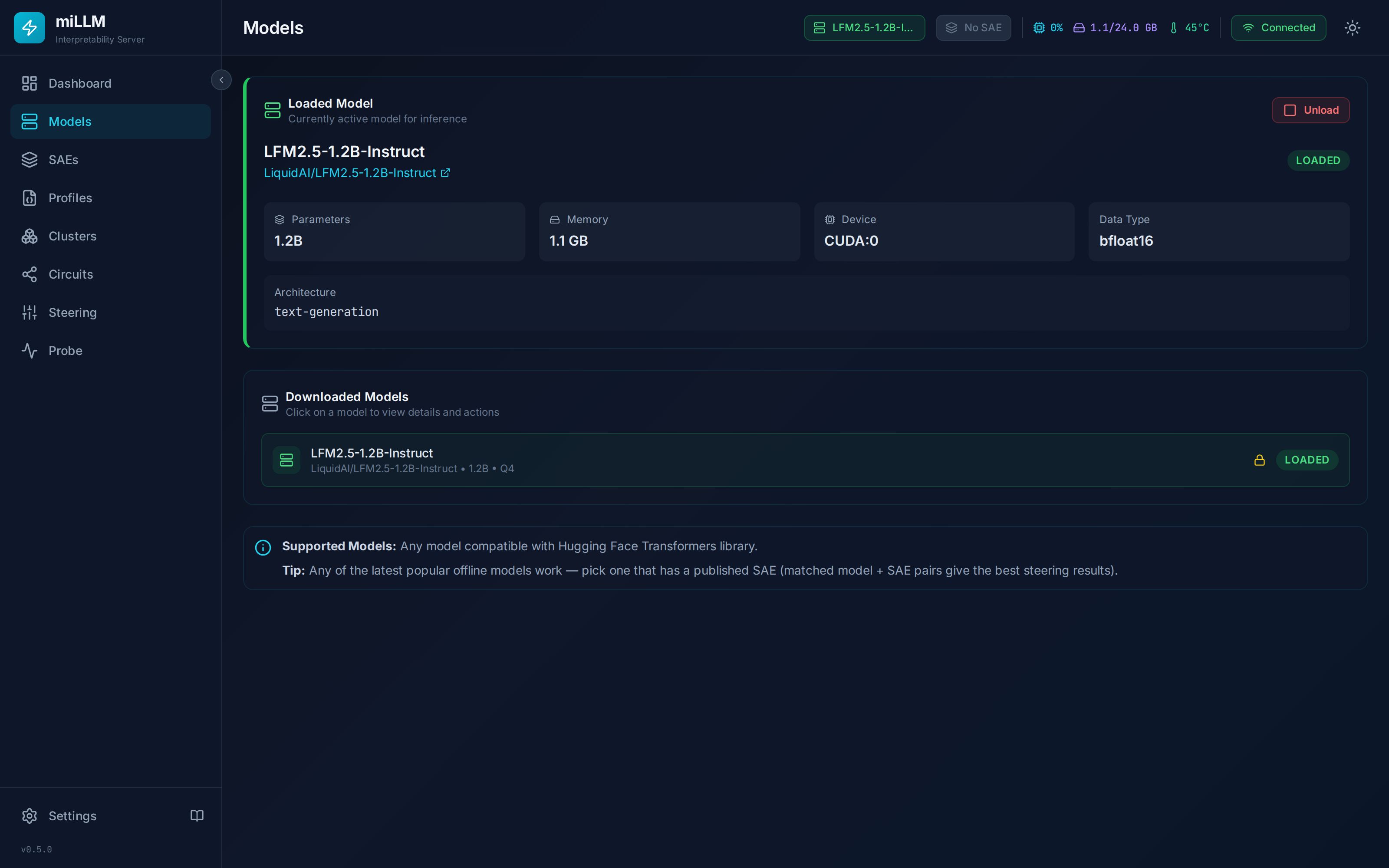
Downloading a Model
- Navigate to Models in the sidebar
- Enter a HuggingFace repository ID (e.g.,
google/gemma-2-2b) — or choose Local Path to import weights already on disk - Click Preview to see the model's size, architecture, and estimated memory per quantization before committing
- Select Quantization:
| Mode | Bits | VRAM Savings | Quality | Best For |
|---|---|---|---|---|
| FP16 | 16 | Baseline | Maximum | Precision research; enables torch.compile |
| Q8 | 8 | ~50% | Minimal loss | Good balance |
| Q4 | 4 | ~75% | Moderate loss | Consumer GPUs |
| Q2 | 2 | ~87% | Significant loss | Maximum compression |
bitsandbytes has no 2-bit mode. A Q2 transformers checkpoint that is not already quantized (one whose config.json carries no quantization_config) is refused at load with UNSUPPORTED_QUANTIZATION, before the served model is unloaded — it would otherwise load unquantized in bfloat16, eight times the memory its Q2 estimate assumes. Choose Q4, Q8 or FP16 for it, or serve a Q2 GGUF of the model.
- Optionally enter a HuggingFace Token for gated models (Gemma and Llama are gated — accept the license on the model page first)
- Check Trust Remote Code only if the model requires custom code (explicit opt-in, per download)
- Click Download & Load Model
Quantization happens at load time, not at download time. Whatever quantization you pick, the download stores the repository's checkpoint exactly as it was published. Then, on every load, bitsandbytes quantizes each weight as it is placed on the GPU. So picking Q4 does not make the download smaller. Downloading the same repository as both FP16 and Q4 stores the same files twice, once in each model's cache directory. Download progress streams over WebSocket to the UI; downloads can be cancelled but not paused.
Prefer FP16 for a model that fits: quantized (bitsandbytes) models cannot use torch.compile, so FP16 decodes faster on capable GPUs despite the extra memory. See Hardware Requirements for sizing tables.
GGUF models and quantization
miLLM serves GGUF files the way Ollama does, alongside HuggingFace checkpoints. A GGUF repository usually publishes several quantizations of the same weights, and Preview lists each one with its file size so you can pick before downloading.
The distinction that matters against the table above: bitsandbytes quantizes a full-precision checkpoint every time it loads, while a GGUF file was quantized ahead of time by whoever published it. What you choose is a file, not a mode — IQ4_XS, Q4_K_M, Q5_K_M and so on.
Several quantizations of one repository can coexist
They are different models with different sizes and different quality, so miLLM keeps them apart by naming a GGUF model repo:QUANT — the convention Ollama already established:
gemma-4-31b-it-3MPER0RR-abliterated-GGUF:IQ4_XS
gemma-4-31b-it-3MPER0RR-abliterated-GGUF:Q4_K_M
Both appear separately in /v1/models instead of one shadowing the other. A custom name you supply is left alone — that is your choice, not a derived one.
A bare repository name still resolves while exactly one quantization of it exists, so existing scripts and saved client selections keep working. Once a second is downloaded the bare name becomes ambiguous, and miLLM returns a 400 naming the tags that exist rather than picking one:
{ "error": { "code": "AMBIGUOUS_MODEL_NAME",
             "message": "'…-GGUF' matches 2 quantizations: …:IQ4_XS, …:Q4_K_M. Name one of them exactly." } }
Choosing silently would make the served model depend on which was downloaded first, with nothing on the wire to say which answered.
Context window
A GGUF model's context is derived, not configured: miLLM reads what the file declares, predicts what free VRAM can hold, and loads at the largest window that fits under the GGUF_CONTEXT_LENGTH ceiling. See Hardware Requirements for the arithmetic and the KV-cache lever that triples it.
Embeddings
GGUF models are loaded with embedding output enabled so /v1/embeddings works without a second load, at a measured ~6.7% generation cost (113.5 → 105.9 tok/s on zora-v1.13 Q5_K_M). Set GGUF_ENABLE_EMBEDDINGS=false to buy that back on a deployment that never embeds.
Some architectures refuse the pooling mode embeddings require, and fail context creation at every length rather than reporting anything useful. When that happens miLLM retries the load without embeddings and records supports_embeddings: false on the model, so a caller is told up front instead of discovering it from a confusing failure at /v1/embeddings. Serving the model matters more than embedding it.
Loading & Unloading
One model is resident on the GPU at a time. Clicking Load on another ready model unloads the current one first. Before loading, miLLM estimates the memory requirement and warns if it exceeds free VRAM.
Unloading is graceful: in-flight inference requests get up to GRACEFUL_UNLOAD_TIMEOUT (default 30 s) to complete before the model is released.
To load a model automatically at server startup, set AUTO_LOAD_MODEL — see Configuration.
Models with Mamba/SSM layers (e.g., granite-4.0-h-*) require the mamba-ssm package for efficient inference. Without it, the naive fallback creates massive intermediate tensors that cause OOM errors. miLLM automatically selects the hybrid KV-cache these architectures need.
Model Locking
When an SAE is attached, the model is automatically locked, so a /v1 request naming another model cannot auto-load over it (409 model_locked). Detaching the SAE unlocks the model automatically; you can also lock/unlock manually from the model details or via POST /api/models/{id}/lock. The lock icon's tooltip reads "Locked for steering".
⚠ The management Load, Switch and Unload actions do not read the lock today — a steering model can be unloaded from here. This is tracked debt; the lease below guards every path.
Model Lease
A caller such as a long labelling job can lease the resident model: while the lease is live, nobody else can load another model, unload it, or swap it — from this page, the API, or a /v1 request — and the refusal (409 MODEL_LEASED) names who holds it and until when. Requests that use the leased model keep working.
A leased model shows an amber key badge beside the lock icon, on the loaded-model card and in the model details: "Leased by midataworks · expires in 1h 12m", with the reason and exact expiry in the tooltip. The badge counts down and disappears when the lease expires; the page refreshes every 10 seconds while a lease exists.
The Admin UI only displays leases — it cannot take, renew or release one, and there is no force-release. A lease lasts at most 2 hours unless its holder renews it. A restart of miLLM ends every lease; holders take a new one once their model is resident. See Model lease.
Deleting
Delete removes the model from disk and the registry (hard delete). A loaded or locked model must be unloaded/unlocked first.
miLLM uses dynamic layer discovery to support any transformer architecture — Llama, Gemma, GPT-2, LFM, Granite, Mistral, Phi, and more. No configuration needed. When you attach an SAE, the attach response reports the exact module hooked (layer_module_path) so you can verify layer resolution on unusual architectures.
API
All of the above is scriptable — see the Models API reference. The model list, download, load/unload, lock/unlock, preview, and delete operations map 1:1 to endpoints.